
Documentation menu
Wake control
A sleeping PC can wake up by itself. A laptop's battery is then empty in the morning, a desktop turns on at night, or Windows installs updates and restarts it with your apps still open. Three things usually wake it:
- Devices: a bumped mouse, a pressed key, network activity, or a USB or Bluetooth adapter. See Wake devices.
- Wake timers: Windows and apps can set a timer that wakes the PC at a set time, for example for maintenance. See Wake timers.
- Scheduled tasks: tasks such as Windows Update can wake the PC, install updates and then restart it. See Wake tasks.
The three pages are in the sidebar under Advanced › Wake control. Select Wake control to show or hide them.
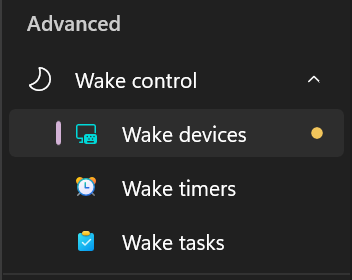
A dot next to a page means it found something that can wake the computer.
Do not wake from sleep
One switch handles all three. Choose Overview in the sidebar, then Simplified, and turn on the switch of the Do not wake from sleep card.

The switch turns off wake for everything that can wake your computer, such as devices, wake timers and scheduled tasks. SystemTuna keeps it off, even when Windows or an app turns it back on. Your mouse and keyboard are left as they are, so you can still wake the computer with them.
The card is green while the recommended settings are in place. It turns amber when something can wake the computer again, for example after you add a new app or device. Select Fix to put the recommended settings back.
Turn the switch off to stop the automatic disabling. Devices, wake timers and tasks keep their current settings.
To choose for each device, timer or task yourself, use the three pages below.
What SystemTuna cannot stop
SystemTuna shows what can wake your PC and lets you turn it off. It cannot promise that your PC never wakes up. The power button always wakes it, and some PCs can be woken by their firmware (BIOS or UEFI), for example by a wake-up time set there. Windows and SystemTuna do not control those.